

API Integration
This subsection contains relevant information for integrating Perselio search through backend APIs.
In this mode, Perselio primarily provides search data based on the information that has been ingested into the platform. The client is responsible for the presentation layer, including graphics, UX, visual design, search engine results page (SERP), autocomplete rendering, and responsiveness across desktop and mobile devices.
If any additional enrichment, transformation, or presentation-specific data is required, such data must either be provided to Perselio during data ingest or be handled on the client side as part of the integration.
This approach gives the client maximum flexibility over the final user experience while allowing Perselio to provide the underlying search capabilities and relevant result data.
Prerequisites
Before continuing with this guide, be sure that you have a properly onboarded account and ingested data. See Search Onboarding for more info.
Scenario Search
The core of the search API integration is the Scenario Search endpoint that allows you to perform a search according to a predefined scenario. A scenario represents a particular search use-case, such as:
- autocomplete search in product catalog
- search and/or filtering in items catalog
- search in categories
- search in brands
- search in articles/texts
Each use-case translates into a dedicated HTTPS call to the search API, which responds with found entities (catalogue items, brands, categories, or other) and with facets (see below).
You can also think of a scenario as a particular UX widget on a web page that needs to be rendered.
The scenario concept simplifies the call to the bare minimum, so that the caller only fills a minimal set of parameters (sort, filter, and user identification) and does not have to deal with implementation details (which dataset to query, what synonym sets to use, what typo-correction strategies to apply, etc.).
For particular scenarios with integration guide, examples and screenshots, see Scenarios.
User identification
Every scenario search request must be scoped to a visitor. The request body carries two identification fields:
zoeId— the anonymous browser identifier, stored in the_sacookie on your domain.userId— your own identifier of the logged-in customer.
At least one of them is required — zoeId must be set when userId is null, and vice versa. Send both whenever the visitor is logged in.
Without identification, search results cannot be personalized and search interactions cannot be attributed to a visitor. When calling from your backend, read zoeId from the _sa cookie — see User Identification for the cookie format, consent behavior, and the rules to follow.
Measuring rendered results
API integration removes Perselio from the request path, not from the measurement path. The Data Collector still has to be on your pages, and the autocomplete and results page you render must be marked so impressions, clicks and searches without results can be attributed to Perselio search — see Marking Rendered Search Results.
Facet
Particularly important fields in your catalogue can have so-called faceting enabled. Faceting means that the search results are grouped into categories and counted, so users can quickly refine the result set or quickly navigate into relevant categories or brands. Typical examples include brand, category, color, size, or price range. Facets are commonly shown in the UI as filter options with result counts, such as Nike (124) or Black (58) as shown on the screenshot below.
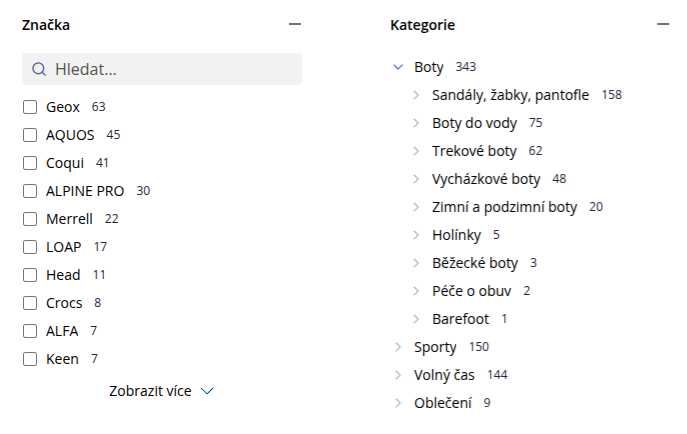
Example category and brand facets rendered for purposes of search results filtering.
Facets are useful in situations where a search query returns a broader set of results and the user needs to narrow them down using specific item attributes. For example, a search for running shoes may return products from multiple brands, in various colors, sizes, and price ranges. Facets allow the user to refine the results step by step by selecting relevant values, such as a specific brand, color, or size. This is particularly important for search experiences with larger catalogs, where filtering by structured attributes is a key part of the user journey.
See Scenarios for concrete usage examples.
Advanced results rendering
In some use cases, it may not be enough to render just the list of found items — it may also be necessary to render e.g. category images or images in the product filters such as colors:
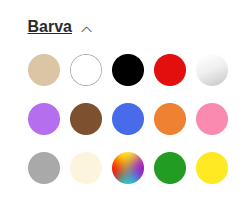
Facet color with dedicated image instead plain text (can be used for filtering on SERP page)

Images of particular categories
Depending on the type of integration and the data available in your e-commerce solution, this may pose a challenge.
To achieve this, consider the strategies below.
Option 1: data enrichment
The recommended strategy is to enrich the search results on your backend — intercept the search response and inject additional images or related data into the returned entities.
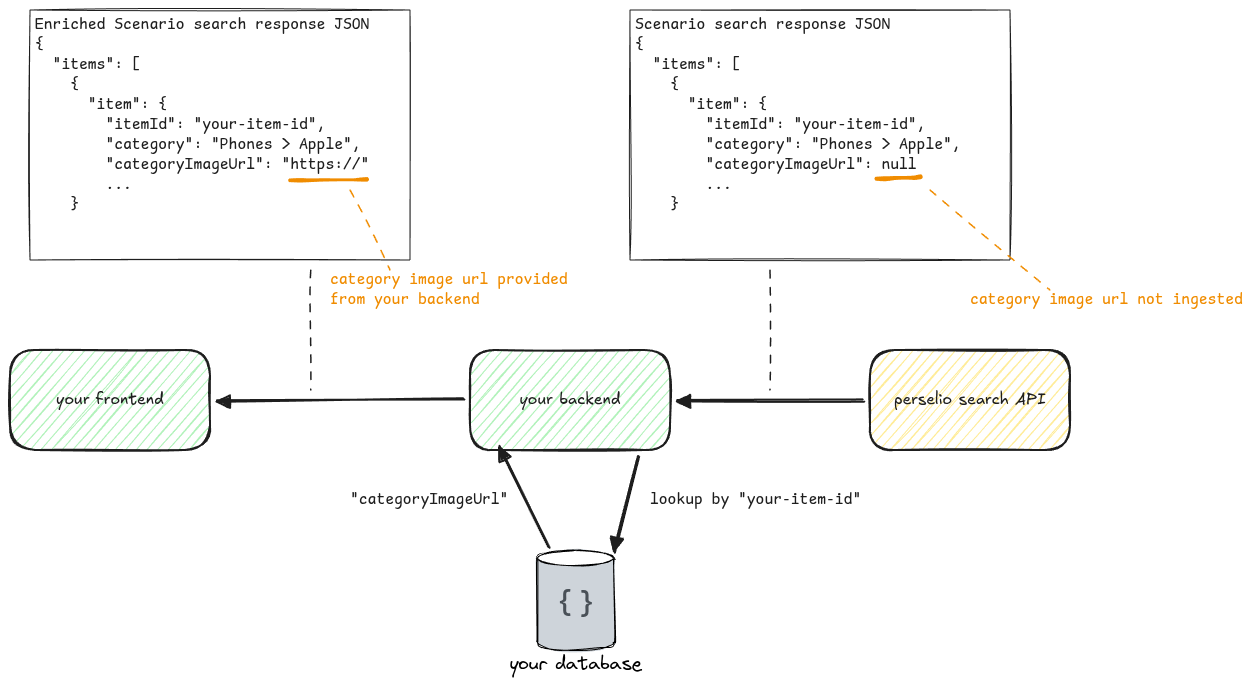
Example flow how to enrich a search response when the categoryImageUrl is not provided in the item feed.
The advantage of this approach is that you don't need to share your frontend logic / images with Perselio and you can self-sufficiently perform frontend changes without depending on a third-party system. This integration is cleaner, simpler, and therefore recommended.
The disadvantage is that you need to be able to identify a particular entity (e.g. category or brand) deterministically, which may be a challenge for some e-commerce solutions. This may mean:
- You may need to extend feeds (Google Feed, Heureka Feed, or other) with non-standard fields (
brandId,categoryId,categoryImageor other) so that you can do the deterministic mapping (category to its image). This is because:- these kinds of feeds typically do not support IDs and work on string representations of entities like brands, categories, or other)
- depending on the particular e-commerce system, it may not be supported to lookup values (category or brand) by their localized value
- you must verify that you can use the potentially localized value to perform the mapping, e.g. for categories, you must be able to use category in format
Electronics > Mobile Phones > Appleand by this value find the appropriate image - you must use our /item API instead of the XML/JSON feeds and provide appropriate IDs there
Option 2: second scenario call
If the data enrichment is not an option, another way to implement advanced rendering is to
- perform a standard scenario search, read items/facets as necessary
- then use these found values to query a dedicated scenario (e.g.
autocomplete-categories) that will perform the lookup into the category dataset and return the appropriate data
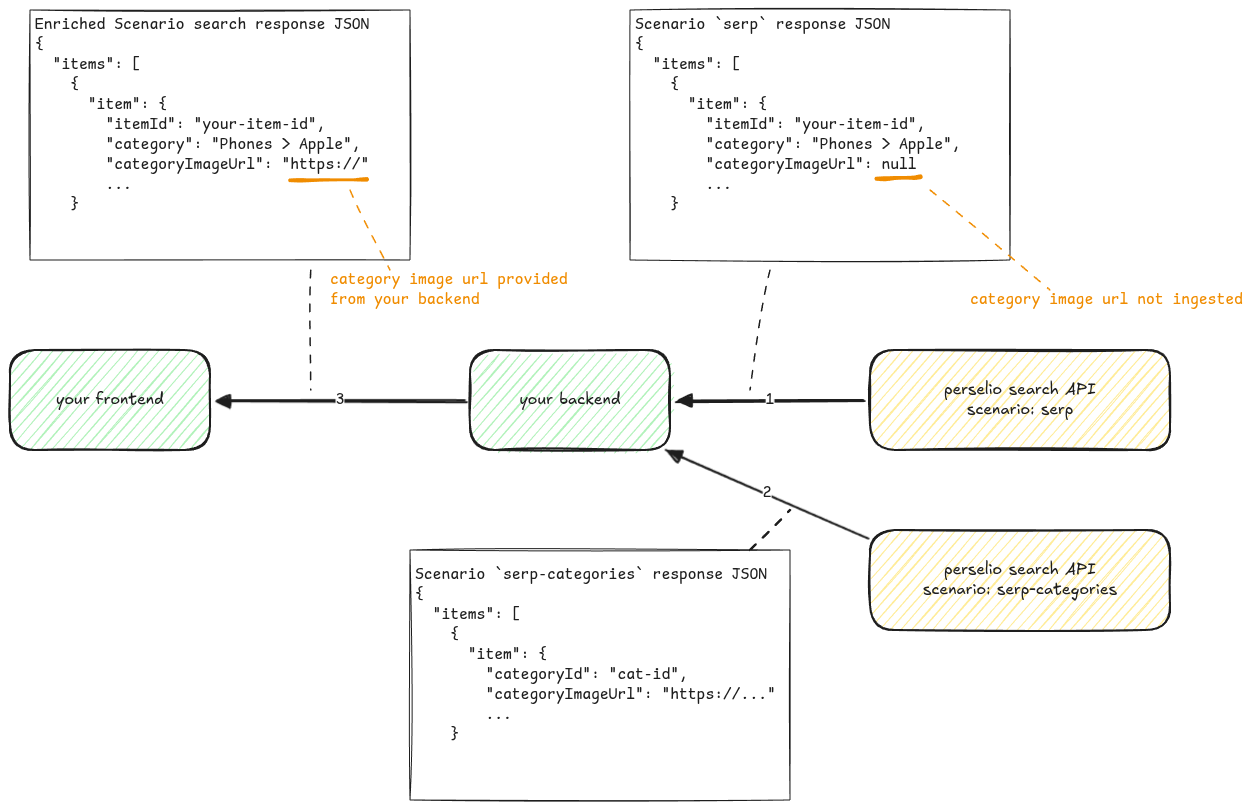
Example data enrichment for case, when the categoryImageUrl cannot be in the standard feed but can be provided by external category feed.
The prerequisite is to have the appropriate feeds ingested (Category Feed, Brand Feed) that contain the necessary data and also proper mapping so that the results from the main search can be used for this purpose (e.g. the category or categoryId provided in the item feed must match the category or categoryId in the provided category feed).
The advantage of this approach is that you do not have to perform the enrichment on your backend.
The disadvantage is that you must provide the secondary feeds (category, brand, or other) and accept the additional call to fetch/map the additional data.
Updated about 13 hours ago