

autocomplete
Allow user to see a quick search results of item catalogue as he types into the main search box
See example on screenshot:
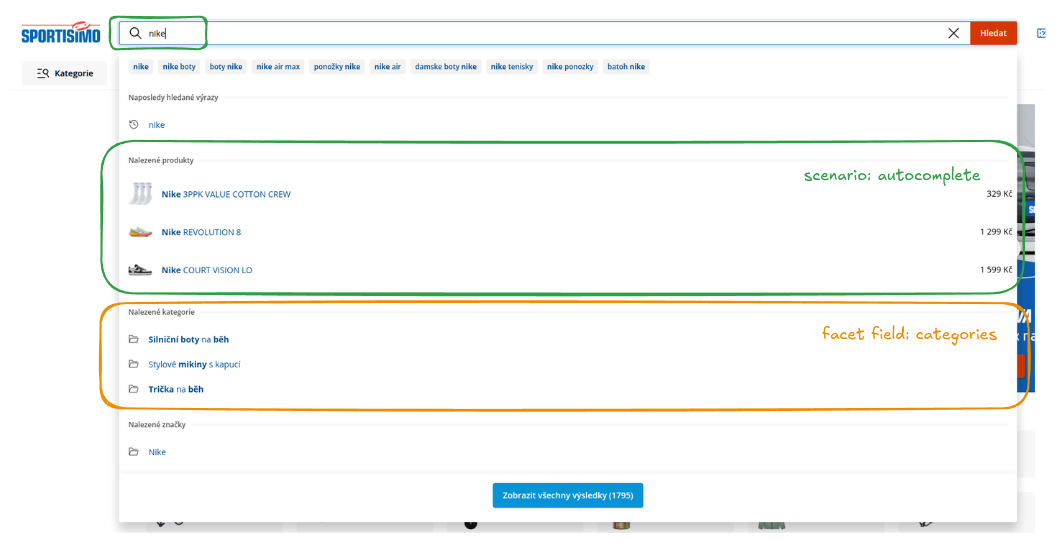
In order to render this autocomplete widget using the API integration, one must:
- call the scenario search endpoint with scenario
autocompletewhich will perform query to the main product catalogue with appropriate search settings - parse the
itemsfrom the response to render the list of found catalogue items (the green part of the widget on the screenshot above, i.e. item list and their images/prices etc.) - parse the
facetCountsfield from the response to render any other related datasets (the orange part of the widget on the screenshot above) that are derived from the scenario call, such as:categoriesbrands
- (optional) perform data enrichment if necessary (e.g. to have proper category URLs), see advanced data rendering
- (optional) use the
highlightfield in your widget to render parts of the string that matched the searched query (see image above for bold text and JSON example response below)
Example call
Call to the autocomplete scenario:
curl -X POST --location "https://api.develop.perselio.com/api/v3/search/scenarios/autocomplete/query" \
    -H "Accept: application/json" \
    -H "Content-Type: application/json" \
    -H "Authorization: Zoe-Token YOUR-TOKEN" \
    -d '{
          "searchQuery": "iphone",
          "page": 0,
          "pageSize": 10,
          "zoeId": "anonymous-user-id"
        }'
JSON response (truncated):
{
  "items": [
    {
      "item": {
        "available": true,
        "brand": "Apple",
        "categories": [
          "Electronics > Mobile Phones"
        ],
        "categoriesByLevel": {
          "lvl1": [
            "Electronics"
          ],
          "lvl2": [
            "Electronics > Mobile Phones"
          ],
        },
        "categoriesLeafs": [
          "Smartphones"
        ],
        "id": "IP15PRO-256-BT",
        "imageUrls": [
          "https://example.com/images/iphone-15-pro-black-titanium-1080.jpg"
        ],
        "itemId": "IP15PRO-256-BT",
        "labels": [
          {
            "backgroundImageUrl": null,
            "colorBackgroundHex": "#1f7a1f",
            "colorFontHex": "#FFFFFF",
            "groups": [
              "image-top-left"
            ],
            "id": "free_shipping",
            "text": "FREE SHIPPING",
            "weight": null
          }
        ],
        "name": "Apple iPhone 15 Pro 256 GB Black Titanium",
        "normalizedUrl": "https://www.example.com/apple-iphone-15-pro-256gb-black-titanium/",
        "url": "https://www.example.com/apple-iphone-15-pro-256gb-black-titanium"
      },
      "highlight": {
        "categories": [
          {
            "matchedTokens": [
              "iphone"
            ],
            "snippet": "Electronics > Mobile Phones > <mark>iPhone</mark>",
            "value": null
          }
        ],
        "name": {
          "matchedTokens": [
            "iPhone"
          ],
          "snippet": "Apple <mark>iPhone</mark> 15 Pro 256 GB Black Titanium",
          "value": null
        }
      }
    }
  ],
  "facetCounts": [
    {
      "fieldName": "categories",
      "counts": [
        {
          "count": 8420,
          "highlighted": "Electronics > Mobile Phones > Smartphones",
          "value": "Electronics > Mobile Phones > Smartphones"
        },
        {
          "count": 3150,
          "highlighted": "Electronics > Mobile Phones > Accessories",
          "value": "Electronics > Mobile Phones > Accessories"
        }
      ],
      "stats": {
        "totalValues": 24
      }
    }
  ],
  "page": 0,
  "pageSize": 10,
  "totalItems": 8420,
  "totalPages": 842
}
Updated 6 months ago
Did this page help you?