

serp
Full search results page — querying, rendering items, facets, highlights, and filtering.
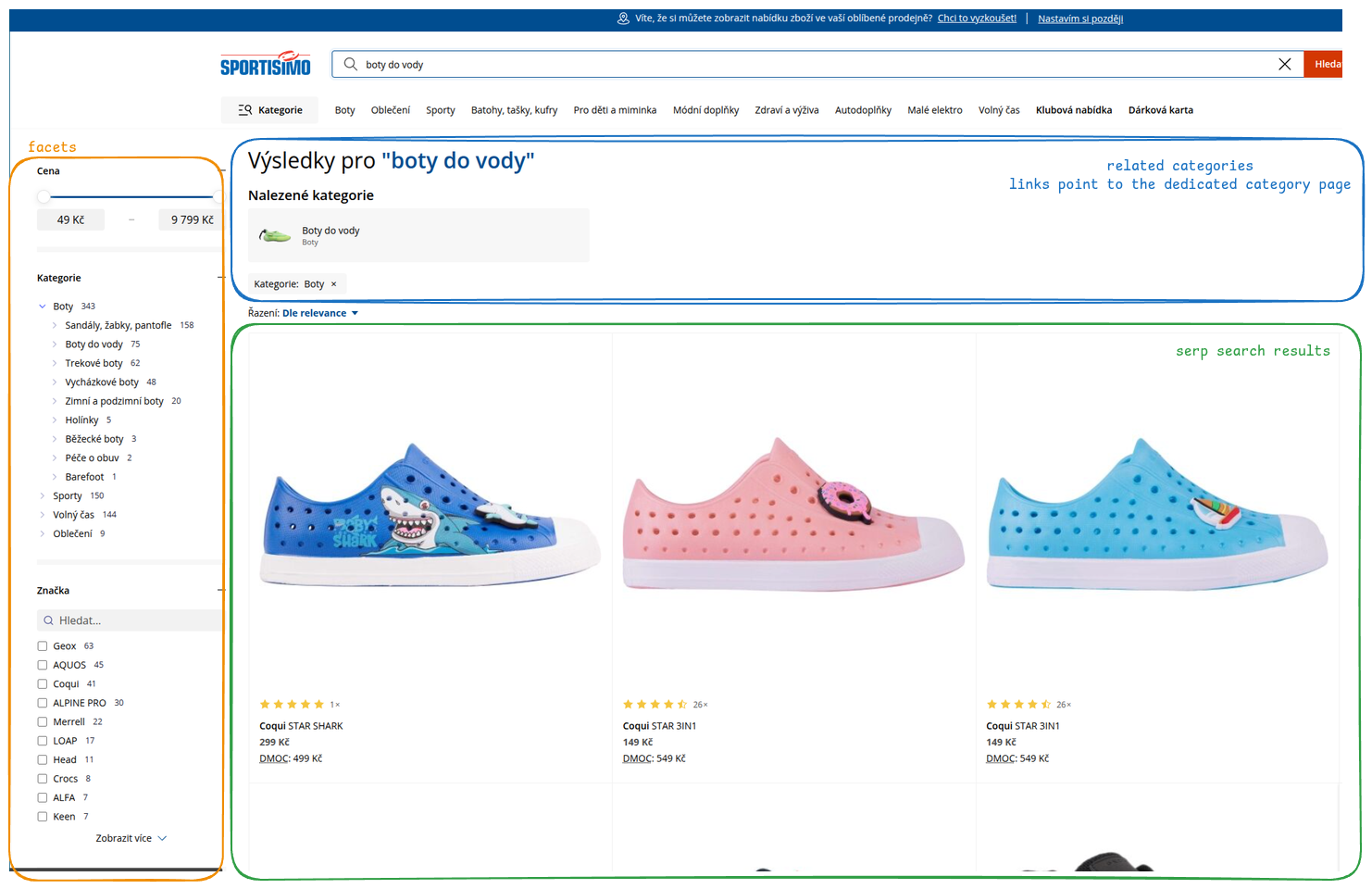
In order to render the full search results page (SERP) using the API integration, one must:
- call the scenario search endpoint with scenario
serpwhich will perform a full-text query against the product catalogue with appropriate search settings - parse the
itemsfrom the response to render the main product grid (the green segment on the screenshot above) - parse the
facetCountsfield from the response to render the filter sidebar (the orange segment on the screenshot above) — each facet (e.g.brand,categories) provides values with counts that can be used as filter checkboxes - use the returned facet values to build follow-up requests with
filtersto narrow results when the user selects a filter (see Filtering results below) - parse
page,totalPages, andtotalItemsto render pagination controls - (optional) render a category navigation widget (the blue segment on the screenshot above) derived from the
categoriesfacet — this is separate from facet filtering and lets users navigate to a dedicated category page on your e-shop (e.g. clicking "Electronics > Smartphones" takes them to the category landing page, not a filtered SERP) - (optional) use the
highlightfield in each item to render parts of the string that matched the searched query (bold text on the screenshot above) - (optional) use
sortto order results by a specific field (e.g. price ascending) instead of the default relevance ordering - (optional) perform data enrichment if necessary (e.g. to have proper category URLs), see advanced data rendering
Example call
Call to the serp scenario:
curl -X POST --location "https://api.develop.perselio.com/api/v3/search/scenarios/serp/query" \
    -H "Accept: application/json" \
    -H "Content-Type: application/json" \
    -H "Authorization: Zoe-Token YOUR-TOKEN" \
    -d '{
          "searchQuery": "smartphone",
          "page": 0,
          "pageSize": 12,
          "zoeId": "anonymous-user-id"
        }'
JSON response (truncated):
{
  "items": [
    {
      "item": {
        "available": true,
        "brand": "Samsung",
        "categories": [
          "Electronics > Mobile Phones > Smartphones"
        ],
        "categoriesByLevel": {
          "lvl1": [
            "Electronics"
          ],
          "lvl2": [
            "Electronics > Mobile Phones"
          ],
          "lvl3": [
            "Electronics > Mobile Phones > Smartphones"
          ]
        },
        "id": "SGS24-128-BK",
        "imageUrls": [
          "https://example.com/images/samsung-galaxy-s24-128gb.jpg"
        ],
        "itemId": "SGS24-128-BK",
        "name": "Samsung Galaxy S24 128GB Black",
        "price": 21999,
        "url": "https://www.example.com/samsung-galaxy-s24-128gb-black"
      },
      "highlight": {
        "categories": [
          {
            "matchedTokens": [
              "smartphone"
            ],
            "snippet": "Electronics > Mobile Phones > <mark>Smartphone</mark>s",
            "value": null
          }
        ]
      }
    }
  ],
  "facetCounts": [
    {
      "fieldName": "brand",
      "counts": [
        {
          "count": 45,
          "highlighted": "Samsung",
          "value": "Samsung"
        },
        {
          "count": 38,
          "highlighted": "Apple",
          "value": "Apple"
        },
        {
          "count": 22,
          "highlighted": "Xiaomi",
          "value": "Xiaomi"
        }
      ],
      "stats": {
        "totalValues": 12
      }
    },
    {
      "fieldName": "categories",
      "counts": [
        {
          "count": 117,
          "highlighted": "Electronics > Mobile Phones > Smartphones",
          "value": "Electronics > Mobile Phones > Smartphones"
        },
        {
          "count": 95,
          "highlighted": "Accessories > Smartphone Cases",
          "value": "Accessories > Smartphone Cases"
        }
      ],
      "stats": {
        "totalValues": 5
      }
    }
  ],
  "page": 0,
  "pageSize": 12,
  "totalItems": 105,
  "totalPages": 9
}
Filtering results
When a user selects a facet value (e.g. checks "Samsung" in the brand filter), call the serp scenario again with the filters array to narrow the results. Filter values correspond to the value strings returned in facetCounts.
Filters follow these semantics:
- Between different facets → AND — an item must match all filter groups simultaneously.
- Within a single facet → OR (using the
inoperator) — an item must match any of the selected values for that facet.
Example: filtering by brand AND category
To show products from Samsung or Apple that are in the "Electronics > Mobile Phones > Smartphones" or "Accessories > Smartphone Cases" category:
curl -X POST --location "https://api.develop.perselio.com/api/v3/search/scenarios/serp/query" \
    -H "Accept: application/json" \
    -H "Content-Type: application/json" \
    -H "Authorization: Zoe-Token YOUR-TOKEN" \
    -d '{
          "searchQuery": "smartphone",
          "page": 0,
          "pageSize": 12,
          "zoeId": "anonymous-user-id",
          "filters": [
            {
              "type": "field",
              "field": "brand",
              "op": "in",
              "value": ["Samsung", "Apple"]
            },
            {
              "type": "field",
              "field": "categories",
              "op": "in",
              "value": ["Electronics > Mobile Phones > Smartphones", "Accessories > Smartphone Cases"]
            }
          ]
        }'
This translates to:
(brand = "Samsung" OR brand = "Apple")
AND
(categories = "Electronics > Mobile Phones > Smartphones" OR categories = "Accessories > Smartphone Cases")Use the exact
valuestrings returned infacetCounts. Facet values are case-sensitive.
The response includes updated facetCounts reflecting the narrowed result set — use these to update the counts displayed next to each filter option.
Range filters
For numeric fields like price, use the range filter type:
{
  "type": "range",
  "field": "price",
  "gte": 10000,
  "lte": 30000
}
Sorting
Pass a sort object to order results by a sortable field instead of the default relevance ordering:
{
  "searchQuery": "smartphone",
  "page": 0,
  "pageSize": 12,
  "zoeId": "anonymous-user-id",
  "sort": {
    "field": "price",
    "direction": "asc"
  }
}
direction accepts asc or desc.
Updated 6 months ago