

Integration options
There are three ways to put Perselio on your site: embed our managed widgets, build your own on the JavaScript SDK, or route everything through your backend. They trade integration effort for control — and they're not exclusive, so you can start with an embed today and go deeper where it pays off.
Perselio can be integrated into your e-commerce site in three ways. They differ in where the call to the Perselio API originates and how much of the UI you own. All three can be combined — for example, managed widgets for a quick start, migrating high-traffic surfaces to native widgets later.
| 1 · Backend to API | 2 · Browser SDK | 3 · Managed widgets | |
|---|---|---|---|
| Effort to integrate | High | Medium | Minimal |
| UI ownership | Full | Full | Perselio-built, themed to your site, adjustable with CSS |
| Backend changes required | Yes | No | No |
| Credentials exposed to browser | No | Scoped client key | Scoped client key |
| Latency | Extra hop via your backend | Direct | Direct |
| Best for | Sites with strict security/data requirements or existing API gateways | Teams with frontend capacity who want custom UI without backend work | Fastest time to value, minimal engineering investment |
1 · Backend to Perselio API
Your widgets remain fully native to your site and talk only to your own backend. Your backend forwards the session and scenario to the Perselio API and relays the response. Perselio is never called directly from the browser.

Pros
- API credentials never leave your infrastructure — no client-side keys, no domain allowlisting.
- Full control over every request: enrich scenarios with first-party data (user profile, stock, pricing), apply your own auth, caching, rate limiting, and logging.
- No third-party JavaScript in the request path — recommendations are fetched server-side, so they are not affected by ad blockers or client-side failures.
- Works with any rendering strategy, including fully server-side rendered pages.
Cons
- Highest integration effort: you build and maintain the proxy endpoints, including streaming pass-through if you use streamed responses.
- Every request takes an extra hop through your backend, adding latency.
- Your backend becomes a scaling and availability dependency for the feature.
- Iteration requires backend involvement — frontend teams can't ship changes to the integration alone.
What is still needed on the page
Backend-to-API removes Perselio from the request path, not from the measurement path. Two things still live in the browser:
- The Data Collector script, which collects behavior and produces the
zoeIdyour backend passes to the API. Your backend reads it from the_sacookie — see User Identification. - The
data-per-recommenderattributes on the blocks you render, so impressions and clicks can be attributed to the recommendations that produced them.
2 · Browser SDK + native widgets
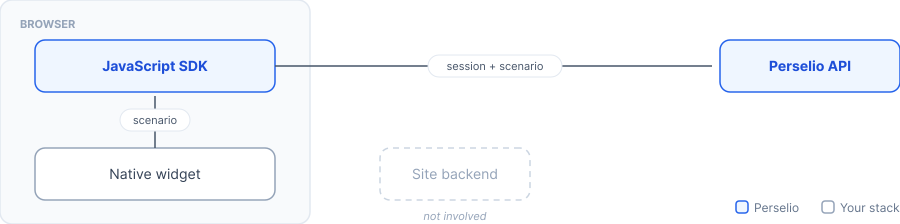
You build the widgets yourself, in your own design system, and hand scenarios to the Perselio JavaScript SDK. The SDK manages the session and calls the Perselio API directly from the browser.
Pros
- Full ownership of the UI — widgets are first-class components in your frontend, consistent with your design system.
- The SDK handles the hard parts: session lifecycle, transport, retries, and streaming.
- No backend changes — frontend teams integrate and iterate independently.
- Direct browser-to-API calls, no proxy hop.
Cons
- Requires a client-side key; even scoped and domain-restricted, the endpoints are visible and callable from the browser, so abuse protection matters.
- Third-party script on the page: bundle size, CSP allowances, and exposure to ad blockers.
- You still build and maintain the widget UI yourself.
- SDK version upgrades become part of your maintenance surface.
3 · Perselio-managed widgets
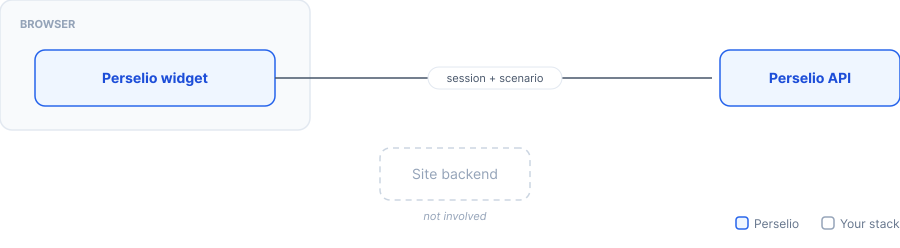
You embed a Perselio-hosted widget with a snippet. The widget runs in the browser and communicates with the Perselio API directly — no site code beyond the embed.
The widget renders directly in the page DOM — no iframes, no shadow DOM — so it can be styled with plain CSS. It ships with a Perselio default design; during onboarding, Perselio themes it to your site through design tokens (CSS variables) covering colors, typography, buttons, spacing, and the item card. This brings the widget close to your site's look and feel; it is not a replica of your own components. Anything the tokens do not cover can be adjusted with your own stylesheet or through Custom Design. Coupling with your site is kept to a minimal contract: you expose the capabilities that require your code (primarily addToCart); page context like products, pricing, and availability is derived by Perselio from the page HTML.
Pros
- Fastest time to value: paste the embed, configure, done. No frontend or backend development.
- Themed to your site during onboarding — colors, typography, buttons, and spacing are set through design tokens, and because the widget lives in the regular DOM, anything else can be adjusted with custom CSS.
- UI is built, tested, and maintained by Perselio — improvements and fixes ship automatically.
- Accessibility, responsive behavior, and localization are handled for you.
- Minimal integration contract: expose add-to-cart functionality and similar capabilities; Perselio handles the rest by analyzing the page.
Cons
- No style isolation cuts both ways: your global CSS can affect the widget, and heavy CSS overrides may need updating when widget markup changes between releases.
- Behavior and layout changes beyond CSS and configuration go through Perselio rather than your codebase.
- Actions that touch your systems work through the exposed capabilities — anything outside that surface (e.g. wishlist, loyalty) needs a capability added on your side first.
Choosing
Start with managed widgets — for most sites they're not just the quick start but the steady state: ready-made UI themed to your site, maintained by Perselio, with a one-capability integration contract. Move to the browser SDK when you need widget behavior and layout that only your own code can deliver. Choose backend-to-API when security policy, data enrichment, or full request control outweigh the integration cost.
Updated 10 days ago